Export Webhook
Cargo Spectre's Export Webhook sends real-time notifications when scans are completed. By setting up a webhook, you can have Cargo Spectre send an HTTP POST request to a specified URL whenever a piece of cargo is scanned, allowing you to automate processes such as updating inventory systems, triggering downstream workflows, or sending notifications.
Payload examples
- JSON
- XML
- CSV
{
  "responses": {
    "dimension": {
      "code": 0,
      "info": {
        "dimensions": {
          "length": 48.5,
          "width": 41.5,
          "height": 46.0,
          "volume": 53.5802,
          "weight": {
            "net": 261.0,
            "gross": 261.0,
            "tare": 0.0
          },
          "density": 4.8712
        },
        "units": {
          "length": "Inches",
          "volume": "CubicFeet",
          "weight": "Pounds",
          "density": "PoundsPerCubicFoot"
        },
        "operatingUser": "fake@shipper.com",
        "cargoID": 6150803,
        "name": null,
        "barcode": "54849138",
        "comments": null,
        "scanDate": "2026-03-24T19:24:26",
        "machineName": "Dock 3",
        "scanGuid": "4a7dc1f5-627e-40d8-a6e0-a499b686d4ff",
        "shareGuid": "760545ab-e3b8-477b-844d-c9dd0754e1a4"
      }
    },
    "snapshot": {
      "code": 0,
      "directory": {
        "images": {
          "path": [
            "fake@shipper.com\\4a7dc1f5-627e-40d8-a6e0-a499b686d4ff\\Kinect4a-0.jpg",
            "fake@shipper.com\\4a7dc1f5-627e-40d8-a6e0-a499b686d4ff\\Kinect4a-0-marked.jpg",
            "fake@shipper.com\\4a7dc1f5-627e-40d8-a6e0-a499b686d4ff\\Kinect4a-1.jpg",
            "fake@shipper.com\\4a7dc1f5-627e-40d8-a6e0-a499b686d4ff\\Kinect4a-1-marked.jpg",
            "fake@shipper.com\\4a7dc1f5-627e-40d8-a6e0-a499b686d4ff\\Kinect4a-2.jpg",
            "fake@shipper.com\\4a7dc1f5-627e-40d8-a6e0-a499b686d4ff\\Kinect4a-2-marked.jpg"
          ]
        },
        "clouds": {
          "path": [
            "fake@shipper.com\\4a7dc1f5-627e-40d8-a6e0-a499b686d4ff\\combined-raw.pcd",
            "fake@shipper.com\\4a7dc1f5-627e-40d8-a6e0-a499b686d4ff\\box.pcd"
          ]
        },
        "misc": {
          "path": [
            "fake@shipper.com\\4a7dc1f5-627e-40d8-a6e0-a499b686d4ff\\Freight-Report.pdf"
          ]
        }
      }
    }
  },
  "Error": null // This will always be null for successful exports
}
Enter your webhook endpoint URL below to send a test POST request with a sample payload.
<responses>
  <dimension code="0">
    <info>
      <cargoID>6150803</cargoID>
      <name/>
      <barcode>54849138</barcode>
      <comments/>
      <scanDate>2026-03-24T19:24:26</scanDate>
      <operatingUser>fake@shipper.com</operatingUser>
      <machineName>Breakroom right K4A</machineName>
      <forkliftName/>
      <scanGuid>4a7dc1f5-627e-40d8-a6e0-a499b686d4ff</scanGuid>
      <shareGuid>760545ab-e3b8-477b-844d-c9dd0754e1a4</shareGuid>
      <dimensions>
        <length>48.5</length>
        <width>41.5</width>
        <height>46.0</height>
        <volume>53.5802</volume>
        <density>4.871202421790139</density>
        <weight>
          <net>261.0</net>
          <gross>261.0</gross>
          <tare>0.0</tare>
        </weight>
      </dimensions>
      <units>
        <length>Inches</length>
        <volume>CubicFeet</volume>
        <weight>Pounds</weight>
        <density>PoundsPerCubicFoot</density>
      </units>
    </info>
  </dimension>
  <snapshot code="0">
    <directory>
      <clouds>
        <path>fake@shipper.com\4a7dc1f5-627e-40d8-a6e0-a499b686d4ff\box.pcd</path>
        <path>fake@shipper.com\4a7dc1f5-627e-40d8-a6e0-a499b686d4ff\combined-raw.pcd</path>
      </clouds>
      <images>
        <path>fake@shipper.com\4a7dc1f5-627e-40d8-a6e0-a499b686d4ff\Kinect4a-1-marked.jpg</path>
        <path>fake@shipper.com\4a7dc1f5-627e-40d8-a6e0-a499b686d4ff\Kinect4a-0-marked.jpg</path>
        <path>fake@shipper.com\4a7dc1f5-627e-40d8-a6e0-a499b686d4ff\Kinect4a-1.jpg</path>
        <path>fake@shipper.com\4a7dc1f5-627e-40d8-a6e0-a499b686d4ff\Kinect4a-0.jpg</path>
        <path>fake@shipper.com\4a7dc1f5-627e-40d8-a6e0-a499b686d4ff\Kinect4a-2.jpg</path>
        <path>fake@shipper.com\4a7dc1f5-627e-40d8-a6e0-a499b686d4ff\Kinect4a-2-marked.jpg</path>
      </images>
      <thumbnails>
        <path>fake@shipper.com\4a7dc1f5-627e-40d8-a6e0-a499b686d4ff\thumbnail\Kinect4a-1-marked.jpg</path>
        <path>fake@shipper.com\4a7dc1f5-627e-40d8-a6e0-a499b686d4ff\thumbnail\Kinect4a-0-marked.jpg</path>
        <path>fake@shipper.com\4a7dc1f5-627e-40d8-a6e0-a499b686d4ff\thumbnail\Kinect4a-1.jpg</path>
        <path>fake@shipper.com\4a7dc1f5-627e-40d8-a6e0-a499b686d4ff\thumbnail\Kinect4a-0.jpg</path>
        <path>fake@shipper.com\4a7dc1f5-627e-40d8-a6e0-a499b686d4ff\thumbnail\Kinect4a-2.jpg</path>
        <path>fake@shipper.com\4a7dc1f5-627e-40d8-a6e0-a499b686d4ff\thumbnail\Kinect4a-2-marked.jpg</path>
      </thumbnails>
      <misc>
        <path>fake@shipper.com\4a7dc1f5-627e-40d8-a6e0-a499b686d4ff\Freight-Report.pdf</path>
      </misc>
    </directory>
  </snapshot>
</responses>
cargoID,name,barcode,comments,scanDate,machineName,scanGuid,length,width,height,volume,density,netWeight,lengthUnit,volumeUnit,weightUnit,densityUnit,images,pointClouds,miscFiles
6150803,"",54849138,"",03/24/2026 07:24:26 PM,"Breakroom right K4A",4a7dc1f5-627e-40d8-a6e0-a499b686d4ff,48.5,41.5,46.0,53.5802,4.871202421790139,261.0,Inches,CubicFeet,Pounds,PoundsPerCubicFoot,"fake@shipper.com\4a7dc1f5-627e-40d8-a6e0-a499b686d4ff\Kinect4a-1-marked.jpg;fake@shipper.com\4a7dc1f5-627e-40d8-a6e0-a499b686d4ff\Kinect4a-0-marked.jpg;fake@shipper.com\4a7dc1f5-627e-40d8-a6e0-a499b686d4ff\Kinect4a-1.jpg;fake@shipper.com\4a7dc1f5-627e-40d8-a6e0-a499b686d4ff\Kinect4a-0.jpg;fake@shipper.com\4a7dc1f5-627e-40d8-a6e0-a499b686d4ff\Kinect4a-2.jpg;fake@shipper.com\4a7dc1f5-627e-40d8-a6e0-a499b686d4ff\Kinect4a-2-marked.jpg;","fake@shipper.com\4a7dc1f5-627e-40d8-a6e0-a499b686d4ff\box.pcd;fake@shipper.com\4a7dc1f5-627e-40d8-a6e0-a499b686d4ff\combined-raw.pcd;","fake@shipper.com\4a7dc1f5-627e-40d8-a6e0-a499b686d4ff\Freight-Report.pdf;"
Downloading Files from the Snapshot Payload
The snapshot response in the webhook payload contains file paths for images, point clouds, and other related files.
The files are stored on https://cargospectre.blob.core.windows.net/scans/.
To retrieve a file, simply append the file path from the payload to the end of the URL (be sure to decode any URL-encoded characters such as \\).
Example
If the payload contains the file path fake@shipper.com\\4a7dc1f5-627e-40d8-a6e0-a499b686d4ff\\Kinect4a-2.jpg, you can download the file from https://cargospectre.blob.core.windows.net/scans/fake@shipper.com/4a7dc1f5-627e-40d8-a6e0-a499b686d4ff/Kinect4a-2.jpg.
Expected Response
When Cargo Spectre sends a POST request to your webhook URL, it expects a response with a status code of 200 (OK).
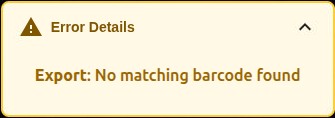
Any other non 2XX status code will be treated as an export failure, and the body of your response will be reported in the Cargo Spectre UI as part of the error details.
For example, if your webhook endpoint returns a status code of 400 (Bad Request) with the response body "No matching barcode found", the Spectre Link app will display this error: